
User Manual
This section provides a detailed description of each feature of the program. It explains how to create, edit, view, and analyze an open channel model, as well as how to use the different tools available in the interface.
The purpose of this manual is to serve as a reference for understanding the complete functionality of the software, from the initial project configuration to the interpretation of the results. You can consult it at any time to resolve specific questions about the use of a feature or workflow.
Input parameters
Section titled “Input parameters”Type of analysis
Section titled “Type of analysis”The types of analysis allow you to add new calculations when running the model.
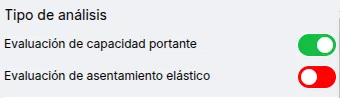
Currently, the following types of analysis are available:
- Bearing capacity assessment
- Elastic settlement evaluation: Not available for continuous footings.
Foundation soil
Section titled “Foundation soil”The foundation soil is used to calculate the bearing capacity. It supports one (1) type of soil.
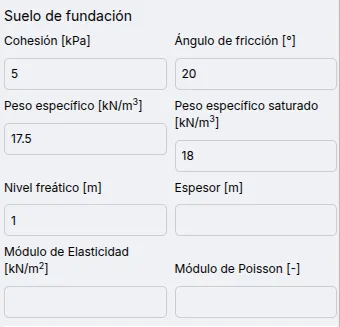
The available parameters for the foundation soil are:
- Cohesion: For bearing capacity only.
- Friction angle: For bearing capacity only.
- Unit weight: For bearing capacity only.
- Saturated unit weight: For bearing capacity only.
- Water table level: For bearing capacity only.
- Thickness: For elastic settlement only.
- Elastic modulus: For elastic settlement only.
- Poisson’s Ratio: Only for elastic settlement.
Structure
Section titled “Structure”Rectangular/square and continuous (running) structures are supported.
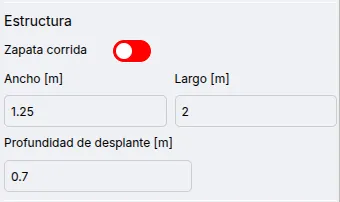
The available parameters are:
- Continuous footing
- Width
- Length
- Embedment depth
The loads allow the calculation of the safety factor and the load-bearing capacity.
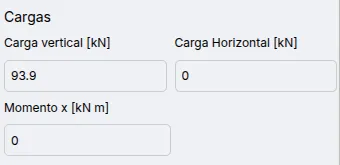
The available parameters are:
- Vertical Load
- Horizontal Load
- Moment
Results
Section titled “Results”Bearing capacity assessment
Section titled “Bearing capacity assessment”It displays detailed parameters for calculating the bearing capacity, along with the safety factor and the eccentricity check. The safety factor is compared to a value of 2.0.
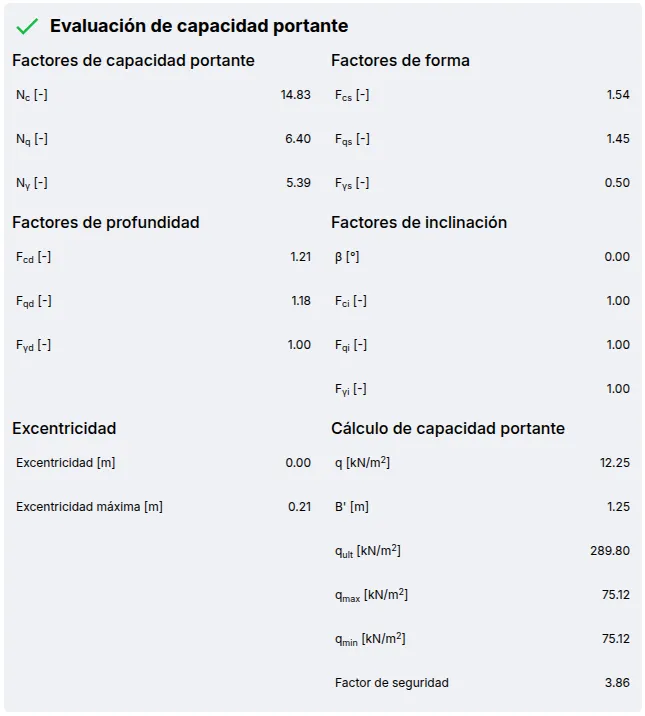
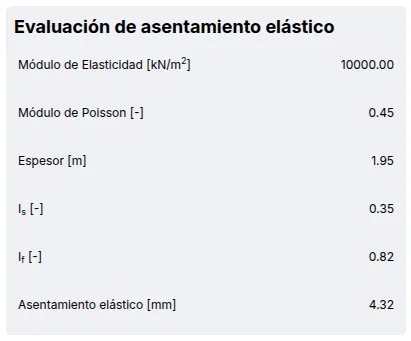
Evaluation of Elastic Settlement
Section titled “Evaluation of Elastic Settlement”It shows the factors for calculating elastic settlement.